2026 Financial Planner Canva KDP
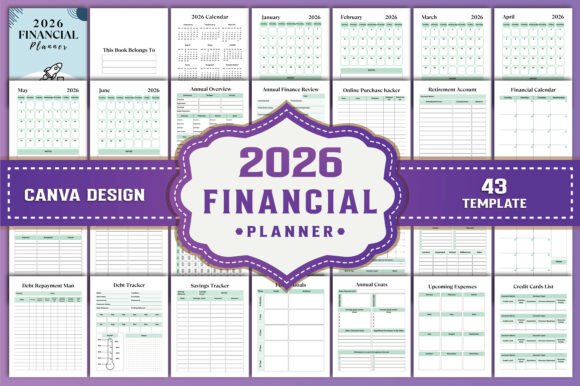
Financial clarity doesn’t emerge from complexity—it emerges from consistency, intention, and tools that align with how you actually work. The 2026 Financial Planner Canva KDP is built for that reality: a fully editable, print-ready financial planning system designed not as a rigid template, but as a strategic scaffold. It’s not about tracking every cent by rote—it’s about creating space for deliberate decisions across income, debt, savings, taxes, and long-term goals—all within a single, cohesive 43-page framework.
Why Customization Matters More Than Ever in 2026
In an era of rising cost-of-living pressures, volatile markets, and shifting tax policies, generic budgeting apps often fall short. They assume uniform priorities, standardized income cycles, and passive data entry—none of which reflect the lived experience of freelancers managing irregular pay, small business owners balancing personal and operational finances, or educators planning for retirement while juggling student loan repayment. The 2026 Financial Planner Canva KDP responds to this by delivering 100% customizable original files—not pre-filled examples, not locked PDFs, but editable Canva templates where every field, label, and layout can be adapted to your rhythm, role, and responsibilities.
This isn’t just convenience. It’s operational leverage. When your planner reflects your actual workflow—not someone else’s idealized version—you’re more likely to use it consistently. That consistency compounds: monthly budget reviews become natural touchpoints, expense patterns surface before they escalate, and annual finance reviews shift from afterthoughts to strategic checkpoints.
Strategic Use Cases Across Roles
The value of the 2026 Financial Planner Canva KDP reveals itself most clearly when matched to real-world roles and rhythms:
- Freelancers & creators: Track project-based income alongside quarterly tax estimates, client payment timelines, and recurring platform fees—all in one place. Use the “Upcoming Expenses” and “Annual Costs” sections to forecast cash flow gaps between contracts.
- Small business owners: Separate personal and business finances visually without needing separate software. The “Cheque Book Register” and “Credit Cards List” support accountability, while the “Debt Repayment Plan” helps prioritize high-interest obligations against growth investments.
- Educators & nonprofit professionals: Map salary increments, stipends, and side-hustle income against student loan amortization and retirement contributions. The “Tax Deductions” and “Donations Tracker” simplify year-end preparation without outsourcing to accountants prematurely.
- Parents planning for education or caregiving: Layer future goals (e.g., college funds, elder care reserves) directly onto the “Savings Tracker” and “Annual Finance Review” pages—linking aspirations to actionable monthly allocations.
What makes this different from spreadsheet-based systems? Control without complexity. You retain full ownership of the data, no login required, no algorithmic assumptions—and crucially, no subscription fee eroding your bottom line.
How to Approach the 2026 Financial Planner Canva KDP Intentionally
Downloading a planner is only step one. Strategic adoption requires alignment—not just with your numbers, but with your habits and thresholds for friction. Start here:
- Define your primary financial priority for Q1 2026. Is it reducing credit card balances? Building a three-month emergency fund? Preparing documentation for a home loan application? Let that goal shape which trackers you populate first—and which you temporarily hide or simplify.
- Block time—not just for filling in numbers, but for interpreting them. The “Monthly Budget” and “Expense Tracker” only create insight when reviewed alongside the “Notes” section. Ask: What surprised me this month? Where did I underestimate timing or frequency? What decision next month would reduce friction in two months?
- Leverage the Canva link for iterative refinement. Revisit your layout every quarter. Maybe the “Yearly Bills Tracker” needs color-coding by due date in February; perhaps the “Investment Tracker” benefits from adding asset class columns in May. Because it’s editable, evolution is built in—not bolted on.
Use the “Annual Overview” page not as a summary, but as a calibration tool. At year’s end, compare what you planned versus what actually occurred—not to judge yourself, but to adjust assumptions. Did freelance income land 15% higher than projected? Then next year’s “Income Tracker” should reflect realistic ranges, not best-case hopes.
Risks of Using the 2026 Financial Planner Canva KDP Without Context
A powerful tool becomes counterproductive when used without purpose. Common missteps include:
- Filling every tracker before establishing a review cadence. Completing all 43 pages feels productive—but if you skip the “Monthly Budget” review for three months, the data loses relevance. Prioritize depth over breadth.
- Assuming “print-ready” means “set-and-forget.” The 8.5 x 11 inch, 300 DPI PDF is optimized for clarity—but its value multiplies when paired with handwritten notes, highlighter emphasis, or marginal questions. Treat the printed version as a thinking partner, not a static artifact.
- Over-customizing early. Changing fonts, colors, and layouts before using the core structure risks delaying real engagement. Master the flow first—then personalize.
Also recognize limitations: This planner does not replace professional tax advice, legal counsel for estate planning, or investment management for complex portfolios. It supports informed conversations with those experts—but shouldn’t substitute for them.
Long-Term Value: Beyond 2026
The 2026 Financial Planner Canva KDP is designed for longevity—not just calendar alignment. Its modular architecture means you can carry forward insights, templates, and even visual frameworks into 2027 and beyond. Export your “Debt Repayment Man” progress chart into a new year’s file. Repurpose the “Emergency Fund Tracker” logic for a business rainy-day fund. Adapt the “Retirement Account” section to include Roth IRA conversions or HSA contributions.
More importantly, it cultivates financial fluency—not just literacy. Fluency is the ability to translate numbers into narrative, uncertainty into options, and goals into sequences of decisions. Every time you update the “Future Goals” page alongside the “Savings Tracker,” you reinforce cause-and-effect thinking. Every time you cross-reference “Monthly Income” with “Upcoming Expenses,” you strengthen anticipatory judgment.
That fluency compounds quietly. It changes how you negotiate contracts, evaluate job offers, assess risk in side projects, or respond to unexpected expenses. It doesn’t eliminate volatility—but it builds resilience within it.
Practical Next Steps
If you’re ready to move beyond reactive money management:
- Download the 2026 Financial Planner Canva KDP and open the editable Canva link—not to edit immediately, but to scan the full 43-page flow. Notice where your attention lingers. That’s often where your highest-leverage starting point lives.
- Print the “Month at a Glance” and “Budget Tracker” pages first. Commit to reviewing them weekly for one month—not to achieve perfection, but to observe patterns in timing, energy, and decision fatigue.
- Use the “Annual Finance Review” page to draft one sentence about your financial posture entering 2026: “I am building stability by…” or “I am preparing for opportunity by…” Keep it visible. Revisit it quarterly.
This isn’t about achieving financial perfection. It’s about building a system that grows with your clarity—where every editable field, every printable page, and every tracked dollar serves a deliberate outcome. The 2026 Financial Planner Canva KDP gives you the structure. Your attention, consistency, and thoughtful revision provide the strategy.