2026 Home Plant Care Planner Canva
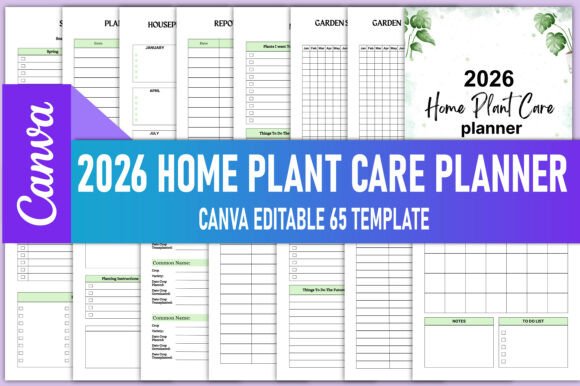
The 2026 Home Plant Care Planner Canva is not just another printable garden journal—it’s a purpose-built operational system for people who treat plant care as both practice and profession. Whether you’re launching a houseplant-focused Instagram account, managing client interiors for a KDP interiors business, running a small-scale urban nursery, or simply nurturing 47 varieties of monstera across three time zones, this planner bridges intention with execution. It delivers high-quality, print-ready PDF files alongside an editable Canva link—giving you full control over layout, branding, color schemes, typography, and content hierarchy before final export.
Why Structure Matters More Than Ever in 2026
Plant care in 2026 isn’t about sporadic watering reminders or seasonal Pinterest pins. It’s about consistency across variables: light shifts, humidity fluctuations, soil pH drift, pest pressure windows, and propagation timing. The 2026 Home Plant Care Planner Canva embeds that complexity into intuitive frameworks—like the Plant Yearly Calendar, which maps dormancy, growth spurts, and repotting thresholds by species; or the Soil Status Tracker, which prompts observation—not assumption—about drainage, compaction, and nutrient depletion. These aren’t decorative sections. They’re decision logs designed to reduce reactive corrections and increase anticipatory care.
Strategic Use Cases Across Roles
For KDP interior publishers, the 2026 Home Plant Care Planner Canva serves dual functions: as a production-ready asset and as a strategic differentiator. You’re not selling “another planner”—you’re offering a vertically aligned toolset for readers who curate spaces *with* plants, not just *around* them. The Garden Layout and Flower Plant Layout pages support spatial reasoning for balcony gardens or studio apartments. The Houseplants Wishlist and My Plants Ideas sections encourage aspirational yet grounded curation—critical for audiences overwhelmed by influencer-driven plant hoarding.
Freelance interior stylists use the Monthly Garden Calendar and Seasonal Checklist to align client shoot timelines with plant readiness—ensuring fiddle-leaf figs are glossy and pest-free before photography, or that calatheas are acclimated before a styled home tour. Educators building botany units pull from the Plant Profile and Propagation Tracker to scaffold student inquiry: “What does root development look like week-to-week?” “How does light direction affect internode spacing?”
Editing With Intent—Not Just Aesthetics
Access to the editable Canva link is powerful—but only if used deliberately. Resist the urge to recolor every page simply because you can. Instead, ask: What outcome am I optimizing for? If your goal is clarity for beginners, simplify language in the Pest Disease Log—swap “chlorosis” for “yellowing between veins.” If you serve commercial landscapers, add columns to the Garden Spraying Tracker for EPA registration numbers and re-entry intervals. Every edit should tighten the gap between input and insight.
Similarly, the Produce Budget and Garden Expense Log aren’t just for backyard growers. They’re financial literacy tools for micro-farmers tracking ROI on heirloom seed investments or educators budgeting for classroom terrarium supplies. When customizing, anchor changes in real-world constraints: time per week, storage capacity, local water restrictions, or vendor lead times.
Where Random Customization Undermines Value
A common misstep is treating the 2026 Home Plant Care Planner Canva as a blank design canvas—replacing core functionality with visual flair. Removing the Crop Rotation Grid to make room for inspirational quotes, or deleting the Fertilizers Inventory to insert more floral borders, sacrifices utility for ornamentation. That weakens credibility, especially among experienced growers who rely on precision. Likewise, overloading the Weekly Garden Planner with overlapping tasks dilutes focus—making it harder to identify true priorities (e.g., “prune schefflera before new growth emerges” vs. “water all pots”).
Think of each section as a calibrated instrument—not a decorative element. The Repotting Tracker, for instance, includes root health notes, pot size change, and aftercare instructions because repotting outcomes hinge on those details—not just the date. Omitting them doesn’t streamline; it invites error.
Planning Beyond the Page
The 2026 Home Plant Care Planner Canva gains long-term value when integrated into broader systems. Pair the Seed Inventory with a physical labeling system using QR-coded plant tags. Link the Garden Journal entries to monthly photo documentation—creating a visual archive of growth patterns. Use the Plant Mind Mapping page not for brainstorming alone, but as a pre-launch audit for new content series: “Which five plants appear most frequently in my ‘Houseplants Wishlist’? That’s where my next YouTube deep dive begins.”
For entrepreneurs, the Garden Organizer and Important Notes Journal become R&D logs—tracking which propagation methods yield highest survival rates, which fertilizers cause leaf burn under LED lighting, or how customer questions cluster around specific pain points (e.g., “why do my ZZ plants yellow after repotting?”). That data informs product development, FAQ structure, and even email nurture sequences.
Realistic Implementation Tips
- Start narrow, not wide: Choose three sections to use consistently for 30 days—e.g., Watering Schedule, Plant Log, and Weekly Garden Planner. Master rhythm before expanding.
- Batch-edit smartly: Update seasonal checklists and fertilizer inventory quarterly—not daily. Let the planner reflect cadence, not chaos.
- Use the PDF output as a benchmark: Print one copy, annotate it by hand for two weeks, then return to Canva to refine digital fields based on actual usage friction.
- Align with your ecosystem: If you use Notion or Airtable for business ops, export key logs (e.g., Expense Log, Seed Starting Log) as CSV backups—not replacements.
Long-Term Positioning Through Consistency
Over time, consistent use of the 2026 Home Plant Care Planner Canva builds what’s often missing in plant communities: institutional memory. The Garden Cleaning Checklist evolves from generic tasks (“wipe leaves”) to context-aware protocols (“wipe monstera leaves with diluted neem solution every third Friday”). The Plants Shopping List transforms from wishful scrolling to targeted sourcing—flagging vendors by germination rate, potting mix compatibility, or shipping reliability.
That depth becomes a quiet differentiator—whether you’re positioning yourself as a trusted KDP publisher, a detail-oriented interior consultant, or a transparent small-batch grower. Readers don’t just buy planners; they invest in continuity. And continuity, when documented well, compounds into authority.
Final Strategic Note
The 2026 Home Plant Care Planner Canva succeeds not because it contains every possible plant-related field—but because it invites disciplined attention to the variables that actually move outcomes. It rewards specificity over spectacle, observation over assumption, and iteration over perfection. When used with clear goals—be it launching a profitable KDP interior line, scaling a plant-care coaching practice, or simply keeping your snake plant alive through three relocations—it becomes less of a tool and more of a thinking partner. One that doesn’t tell you what to grow—but helps you decide, track, adjust, and ultimately, grow with greater clarity.