2026 Finance Budget Planner
Planning your money isn’t about restriction—it’s about clarity, control, and confidence. The 2026 Finance Budget Planner is built for real life: unpredictable paychecks, seasonal income spikes, surprise car repairs, freelance project delays, or that quiet moment mid-month when you wonder where your paycheck went. It’s not a rigid spreadsheet or an app that demands daily logins. It’s a flexible, printable, editable system—designed to adapt to how *you* actually manage money.
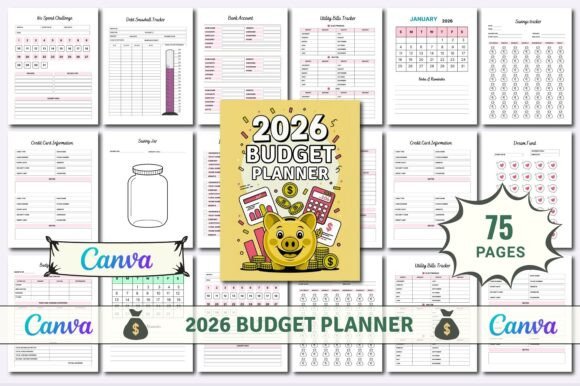
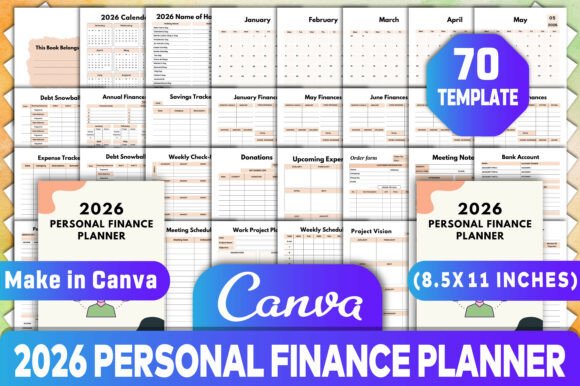
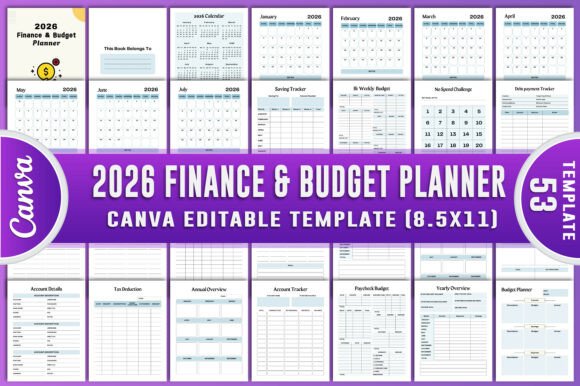
This isn’t just another calendar with blank lines. You get 53 pages of purpose-built financial tools—all in one cohesive, visually clean layout. Every tracker serves a specific need: the 52 Week Savings Tracker helps you build momentum without overwhelm; the Bill Payment Tracker prevents late fees before they happen; the Debt Payment Tracker turns intimidating balances into visible progress; and the No Spend Challenge page gives structure to intentional breaks from spending—not as punishment, but as reset buttons.
What makes it different? Everything is 100% customizable. You’re not stuck with someone else’s categories, colors, or assumptions. Freelancers can rename “Income” to “Client Payments” and add fields for VAT or platform fees. Small business owners can track multiple revenue streams side-by-side. Educators on summer break can shift focus to savings goals during low-income months. Parents managing school supply budgets, subscription fatigue, or donation planning find dedicated spaces—not afterthoughts.
Where This Planner Fits Into Real Days
You’ll reach for the 2026 Finance Budget Planner at moments that feel familiar—not theoretical. Like Sunday evening, coffee in hand, reviewing last month’s Expense Tracker and adjusting next month’s grocery budget after noticing takeout crept up. Or Tuesday morning, opening the Online Shopping Tracker before clicking “Buy Now,” seeing your recent Amazon orders, and pausing to ask, “Do I really need this—or am I just bored?”
It works quietly behind the scenes: the Subscription Tracker helps you spot that $14.99 fitness app you haven’t opened since March. The Tax Deduction Tracker saves receipts and notes right alongside client names—no more frantic December sorting. The Financial Calendar overlays due dates, income deposits, and upcoming expenses so you see cash flow gaps before they become crises.
For creators launching digital products, the Account Details and Paycheck Budget pages help separate personal and business finances—even if you’re still operating from a single bank account. Bloggers use the Shopping List and Donation Tracker to align spending with values, while educators print extra copies for classroom budgeting units or student-led finance projects.
Why Editable Canva + Print-Ready Files Changes How You Use It
Most planners force you to choose: digital convenience or tactile control. The 2026 Finance Budget Planner Canva KDP Interiors bridges that gap. You get both—printable PDF, JPG, and PNG files (high-resolution, CMYK-optimized for professional printing), plus an editable Canva link. That means you can:
- Print a full-color version on thick paper, bind it, and write with your favorite pen—no screen glare, no battery anxiety.
- Open the Canva template on your laptop during a tax prep session and drag-and-drop new categories like “Contractor Payments” or “Equipment Depreciation.”
- Customize fonts, colors, and layouts to match your brand—ideal if you’re a coach, course creator, or small publisher reselling or gifting it to clients.
- Remove pages you don’t need (say, skip the Bi-Weekly Budget if you’re paid monthly) or duplicate the Saving Jar Planner for multiple goals—college fund, vacation, emergency buffer.
This flexibility saves time *and* mental energy. No more building trackers from scratch in Excel. No more switching between five apps. No more guessing whether your handwritten notes will survive a coffee spill. Everything lives in one place—yours to shape, scale, and simplify.
Who Benefits—and How It Shows Up in Practice
Freelancers & solopreneurs use the Income Tracker and Yearly Overview to forecast lean months and adjust rates before burnout sets in. One web designer told us she uses the Upcoming Expenses page to schedule software renewals across quarters—so her Q2 isn’t derailed by three $99 bills hitting at once.
Small business owners rely on the Account Tracker and Budget Overview to compare actuals against projections—without needing an accountant on retainer. A local bakery owner prints two copies: one laminated for the counter (for quick ingredient cost logging), one bound for quarterly reviews.
Educators and parents appreciate the Financial Goals and Monthly Bill Tracker as teaching tools—helping teens understand recurring costs or plan for college savings. A homeschooling parent shared how her 14-year-old now manages his own 52 Week Savings Tracker toward a used bike, learning compound patience along the way.
Everyday users find relief in the No Spend Challenge and Shopping List. Not because they’re overspending—but because decision fatigue is real. Having a clear “yes/no” space before adding items to cart reduces impulse buys by design, not discipline.
Before You Download: What to Keep in Mind
This planner works best when matched to your habits—not forced into them. If you hate writing daily, skip the Daily Expense Log and lean into the Weekly Summary instead. If you prefer voice notes, use the Notes section to jot down audio transcriptions or quick reflections.
It’s designed for realistic consistency, not perfection. Missed a week? Flip to the Monthly Overview and catch up in 10 minutes. Changed jobs or moved? Update the Account Details and Paycheck Budget in Canva—no re-buying needed.
And because it’s 100 customizable original file, you’re never locked in. Want to add a “Side Hustle Tracker”? Duplicate the Income Tracker page and rename it. Need bilingual labels? Swap in Spanish or French text in Canva—no design skills required.
The 2026 Finance Budget Planner doesn’t promise overnight wealth. It offers something quieter, steadier: the ability to look at your money and say, “I know where it is. I know where it’s going. And I’m the one deciding.” That kind of calm doesn’t come from apps or algorithms—it comes from tools built for humans, not hype.