2026 Blood Sugar Planner Canva KDP
If you’re managing blood sugar day in and day out—whether you’ve been diagnosed with prediabetes, type 1 or type 2 diabetes, or you’re supporting a loved one through it—you know how much mental energy goes into tracking meals, meds, moods, and metrics. The 2026 Blood Sugar Planner Canva KDP isn’t just another calendar—it’s a grounded, flexible, printable companion designed for real life: the rushed mornings, the unexpected glucose spikes after dinner, the doctor appointments you almost forget, and the small wins you want to remember.
What It Is (and What It’s Not)
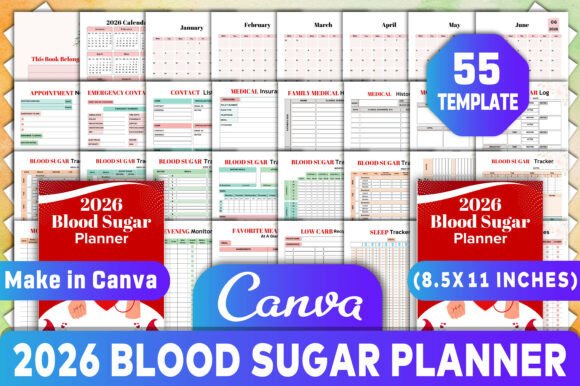
The 2026 Blood Sugar Planner Canva KDP is a professionally structured, fully editable digital planner built for Canva—no design skills needed. When you download it, you get an original, high-resolution file set (PDF, JPG, PNG) at 300 DPI, sized perfectly for 8.5 x 11-inch printing. It includes 55 thoughtfully organized templates—not generic pages, but purpose-built tools like Morning Monitoring, Evening Blood Sugar Log, Symptom Tracker, and Low Carb Recipe Pages. Everything is 100% customizable: change fonts, colors, headers, or even rearrange sections to match your rhythm.
It’s not a medical device or a substitute for professional care. It won’t diagnose, treat, or replace your endocrinologist—but it *does* help you show up to appointments more prepared, spot patterns faster, and feel less overwhelmed by the daily logistics of health management.
Real-Life Moments Where This Planner Makes a Difference
For the newly diagnosed adult (20s–30s): Imagine getting your A1C results back and realizing you need structure—not just data, but context. You start logging meals, but forget to note stress levels or sleep quality. With the 2026 Blood Sugar Planner Canva KDP, the Mood Tracker and Sleep Tracker sit right next to your Blood Sugar Log, so you begin noticing how a poor night’s rest raises your fasting number—even before your provider points it out.
For the busy parent managing their child’s type 1 diabetes: Juggling school nurse notes, carb counts for lunchboxes, insulin adjustments, and after-school sports? The Appointment Notes and Medicine Tracker pages let you record dosing changes mid-day, then print and hand a clean copy to the pediatrician. The Emergency Contact List and Medical Insurance spreads are laminated and taped to the fridge—not buried in a notes app.
For the wellness coach or nutritionist: You don’t hand clients blank journals. You give them something intentional. Many professionals use this planner as a client onboarding tool—customizing the cover with their logo, adding practice-specific prompts to the Notes section, or embedding local holiday dates (all 2026 holidays are pre-filled) so meal planning aligns with cultural or family rhythms.
For the caregiver supporting an aging parent: Tracking BP, symptoms, appointments, and pharmacy refills across multiple providers gets messy fast. The Vital Signs Tracker, Appointment Tracker, and Medical Expenses log consolidate what used to live across sticky notes, texts, and voice memos—making Medicare reviews or family updates far less stressful.
How People Actually Use the Interiors
The 2026 Blood Sugar Planner Canva KDP Interiors shine because they anticipate friction—not just features. For example:
- The Low Carb Food Ideas and Favorite Meals At A Glance pages aren’t static lists. They’re editable grids—so you can drag-and-drop your go-to breakfasts, snap photos of recipes, or paste in links from trusted sites like ADA or Diabetes UK.
- The Blood Sugar Bp Log combines two critical metrics on one line—no flipping between charts. And since it’s editable in Canva, you can highlight ranges (e.g., “Target: 70–130 mg/dL”) in color that matches your glucometer’s display.
- The dual Symptom Tracker and Mood Tracker pages each appear twice—not for redundancy, but for flexibility. One version uses simple checkboxes and emojis; the other offers space for brief narrative notes. You choose what fits your energy level that week.
- The Hygiene Tracker may seem unexpected—until you realize oral health, foot care, and skin checks directly impact long-term outcomes. It’s subtle support for habits that often fall off the radar.
Things to Consider Before You Download
This planner works best if you value consistency *and* control. Since it’s Canva-based, you’ll need free access to Canva (no Pro subscription required). If you prefer handwriting exclusively, the PDF is print-ready—but keep in mind: once printed, edits require re-printing. Some users print only the pages they’ll use that month, keeping the rest digital for quick tweaks.
It’s optimized for individual or small-group use—not enterprise EHR integration. So while it syncs beautifully with your personal routine, it doesn’t auto-populate from CGM apps or insurance portals. That’s intentional: it keeps your data private, offline, and entirely yours.
Also worth noting—the 2026 date specificity means it’s not reusable year after year. But that’s a strength: holidays, moon phases (for some holistic users), and even daylight saving shifts are accurate. You’re not guessing whether Thanksgiving falls on the 23rd or 30th—you’re planning around reality.
Why “Editable” Matters More Than You Think
Customization isn’t about aesthetics—it’s about reducing cognitive load. One user replaced all “Blood Sugar” headers with “Glucose Levels” to match her clinic’s language. Another added icons beside each meal slot (🥑 for healthy fat, 🥦 for fiber) so her teen could log without reading paragraphs. A third hid the Medical Expenses tab entirely and expanded the Monthly Health Goals section—because budgeting wasn’t her priority, but building stamina was.
That level of personalization turns a template into a tool that feels like it was made *for you*, not just sold to you. And because you own the original Canva file, you can duplicate pages, merge trackers, or even create a parallel version for a spouse or partner—keeping shared goals visible without merging private logs.
Who Might Want to Look Elsewhere
If you rely heavily on automated syncing (e.g., pulling numbers directly from Dexcom or LibreLink), this planner complements—but doesn’t replace—those apps. It’s ideal for reflection, not real-time alerts. Similarly, if you prefer minimalist, single-page dashboards over detailed monthly spreads, you may find the 55-page scope generous rather than essential. That said, many users simply hide or delete unused pages in Canva before exporting—keeping only what serves their current season of health.
And while the design is clean and accessible, it’s not built with advanced screen reader compatibility or dyslexia-friendly fonts out of the box. Users needing those features often adjust typography in Canva before printing—a small step that makes a meaningful difference.