2026 Financial Project Planner
Planning isn’t just about setting goals—it’s about building the infrastructure that supports consistent, informed financial decisions across time, projects, and priorities. The 2026 Financial Project Planner is designed for that exact purpose: a structured yet flexible system to track, adjust, and reflect on financial commitments—not as abstract numbers, but as living parts of your work, growth, and daily operations.
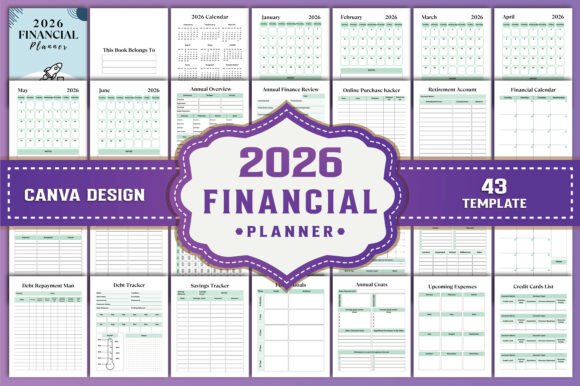
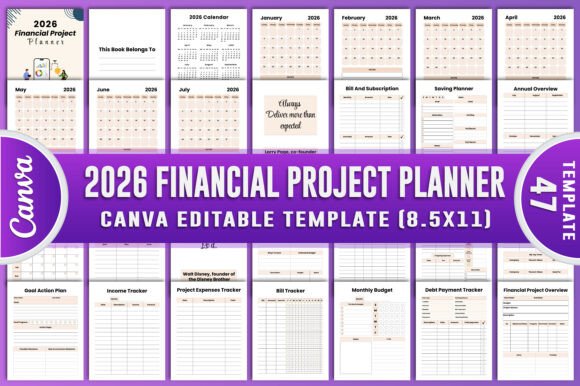
This isn’t a generic budget sheet or a static calendar overlay. It’s a 47-page, fully editable resource built around real-world financial workflows—whether you’re launching a product, managing client projects, scaling a small business, or organizing creative income streams. Every page serves a functional role, from startup cost forecasting to tax-deductible expense logging, and every element is customizable without design expertise.
How It Fits Into Your Workflow—Before, During, and After
The value of the 2026 Financial Project Planner emerges most clearly when aligned with actual project phases—not as a standalone document, but as an operational companion.
Before a project begins: Use the Financial Project Overview, Startup Costs, and Goal Action Plan pages to map assumptions, define scope boundaries, and allocate initial capital. This step forces clarity—on what’s essential versus optional, what’s estimated versus verified, and where flexibility must be built in. For freelancers quoting a website redesign or educators launching a paid course, this pre-work prevents scope creep and misaligned expectations.
During execution: The Project Expenses Tracker, Monthly Finances, and Bill Tracker become active control points. You’re not just recording spend—you’re comparing against original estimates, spotting trends (e.g., recurring software costs rising faster than projected), and adjusting monthly budgets before variances compound. Marketers running Q1 campaigns, for example, can use the Marketing Budget page alongside the Rates Tracker to assess ROI per channel while staying within quarterly allocations.
After completion: That’s when the Annual Overview, Tax Deduction Notes, and No Spend Challenge Reflection pages gain weight. Reviewing actuals against plans surfaces patterns: which categories consistently under- or over-perform, where automation could replace manual tracking, or how seasonal fluctuations affect cash flow. Small business owners often discover they’ve overestimated freelance labor costs—or underestimated subscription renewals—only after reviewing full-year data in context.
Integration With Tools You Already Use
The 2026 Financial Project Planner Canva KDP Interiors isn’t meant to replace accounting software—but to complement it. Think of it as the “thinking layer” between raw data and strategic action.
- With QuickBooks or Xero: Export transaction summaries monthly, then summarize key takeaways directly into the Monthly Financial Plans or Debt Payment Tracker. This bridges automated bookkeeping with intentional review.
- With Notion or Airtable: Use the planner for high-level planning and reflection; move granular task-level tracking or collaborative updates to those platforms. The Notes Ideas and Shopping List pages work especially well as lightweight capture zones before migrating details elsewhere.
- With Canva itself: Since you receive an editable Canva link, you can duplicate pages for specific clients, campaigns, or departments—then export individual sections as branded PDFs for stakeholder reviews or internal handoffs.
This interoperability matters because financial clarity rarely lives in one place. The planner acts as a central hub—where numbers meet narrative, and spreadsheets meet strategy.
Practical Implementation Tips
Getting consistent value from the 2026 Financial Project Planner depends less on perfection and more on rhythm and intentionality. Here’s what works in practice:
- Block 20 minutes at month-end—not month-start. Reviewing actuals *after* the month closes builds accuracy. Use the Budget Checklist and Annual Budget Saving Planner to adjust next month’s targets based on real behavior—not optimism.
- Color-code by function—not category. Instead of coloring “marketing” blue and “software” green, assign colors to *purpose*: red for items requiring approval, yellow for estimates needing verification, green for confirmed. This shifts focus from labeling to decision-making.
- Print only what you’ll physically annotate. The high-resolution 8.5 x 11″ PDF (300 DPI, no bleed) ensures crisp printing—but many users find the Saving Jar or Financial Goals pages most effective when handwritten. Keep digital versions for data-heavy pages like the Income Tracker and print only reflective or action-oriented ones.
- Use the “This Book Belongs To” page as a commitment anchor. Write your name, role, and one sentence about why this year’s financial clarity matters to you. Revisit it quarterly. It grounds the tool in personal relevance—not just process.
Why Customization Matters—Beyond Aesthetics
“100 customizable original file” isn’t marketing language—it reflects how financial needs diverge across roles. A blogger tracks affiliate income and hosting fees differently than a contractor managing equipment depreciation and insurance premiums. An educator launching a workshop series prioritizes venue deposits and material costs; a podcaster focuses on mic upgrades and editing software subscriptions.
Customization here means swapping labels, rearranging sections, hiding irrelevant trackers (e.g., omitting Startup Costs if you’re not launching anything new), or adding custom columns to the Project Budget page. Because it’s built in Canva—not locked in static PDF—you retain full control without needing Photoshop or Illustrator skills.
This level of adaptability supports long-term use. You’re not buying a single-year planner—you’re acquiring a reusable framework. Update the 2026 calendar header for 2027. Repurpose the Shopping List as a vendor sourcing log. Convert the Tax Deduction Notes into a checklist for your CPA. The structure stays reliable; the content evolves with your work.
Quality, Consistency, and Real Efficiency
Time savings come not from speed alone—but from eliminating rework. The 2026 Financial Project Planner delivers high-quality print-ready files so you avoid last-minute formatting fixes, blurry exports, or mismatched margins. The 300 DPI resolution ensures sharp text and clean lines—even when printed double-sided on standard office paper. No bleed means no trimming or alignment guesswork.
Consistency builds trust—in your data and your process. When every month uses the same tracker layout, comparisons become intuitive. When the Debt Payment Tracker and Monthly Budget share the same date range logic, you reduce cognitive load. And because all 47 pages are part of one cohesive system—not a bundle of unrelated templates—you maintain continuity across planning, execution, and review.
That consistency compounds. After three months of use, many users report fewer spreadsheet toggles, fewer “Where did I put that number?” moments, and more confidence in saying “yes” to opportunities—because they know exactly where their capacity lies.
Who Benefits Most—and How They Use It Differently
Freelancers treat the Project Budget and Rates Tracker as negotiation prep tools—documenting actual hours versus quoted scope before revising rates. Educators use the Annual Overview and Financial Goals pages to align course launches with tuition cycles or grant timelines. Bloggers rely on the Shopping List and No Spend Challenge Notes to separate growth investments from impulse purchases.
Even hobbyists building side businesses find utility—not in tracking profit, but in understanding effort-to-outcome ratios. One user repurposed the Bill Tracker to monitor craft supply costs across 12 Etsy listings, then used the Saving Planner to fund her first trade show booth.
The common thread isn’t industry—it’s intention. If you make decisions that involve money, time, and future outcomes, the 2026 Financial Project Planner gives you a repeatable, adaptable, and human-centered way to do it with greater awareness—and less friction.