Digital Tumbler Business Planner: Your All-in-One Launchpad for Tumbler Entrepreneurs
If you’ve ever stared at a blank spreadsheet wondering how to track pre-orders while designing your next tumbler mockup in Canva—or juggled inventory counts, customer waitlists, and tax-deductible supply receipts all in separate tabs—you’re not just busy. You’re stretched thin across too many tools. The Digital Tumbler Business Planner was built for exactly that moment: when passion meets logistics, and you need clarity—not complexity.
What It Really Is (and What It’s Not)
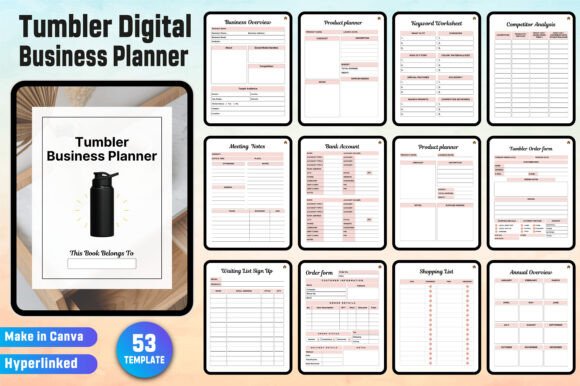
This isn’t a generic business template repackaged with a tumbler icon. It’s a purpose-built digital toolkit designed specifically for creators selling custom tumblers—whether you're running a side hustle from your garage, launching at local craft fairs, or scaling into wholesale and online marketplaces. You get two core deliverables: high-resolution, print-ready JPG files for professional stall displays or client presentations, and a fully editable Canva document—pre-formatted, hyperlinked, and organized around real tumbler-business workflows.
Crucially, it’s not software. There’s no subscription, no login wall, no forced updates. It lives in your Canva account—wherever you already design logos, mockups, and social posts. And because it’s delivered as a Fully Hyperlinked PDF, one click jumps you from your “Waiting List Sign Up” tab straight to your “Pre-Order Form,” then to your “Packaging Inventory”—no scrolling, no searching.
Where It Fits in Real Life (Not Just Theory)
At the craft fair stall: You hand a customer a printed “Stall Display Inventory” page showing live stock levels (e.g., “Rose Gold 20oz – 3 left”), then scan their QR code to add them to your “Waiting List Sign Up” sheet—all before they’ve finished sipping their coffee. Later, you update “Sales Log” and “Countdown to Market” on your phone during the drive home.
During product development: You’re testing matte black vs. glossy white finishes—and use the “Product Evaluation” and “Show Products Research” pages side-by-side to compare supplier quotes, customer feedback snippets, and photo samples. No more lost notes in voice memos or sticky tabs falling off your laptop.
When tax season looms: Instead of digging through 17 email threads for receipt confirmations, you open “Tax Deduction” and “Purchase Tracker.” Every qualifying supply purchase is logged with date, vendor, amount, and category—and linked directly to your “Bank Account” overview. Even “Donation Tracker” helps if you donate tumblers to local schools or shelters.
Who Benefits—and How Differently
The solo creator (ages 20–35): You’re juggling full-time work and launching evenings/weekends. You love Canva, hate Excel formulas, and need speed. With the Digital Tumbler Business Planner, you copy the Canva doc in under 30 seconds, rename “Tumbler Order Form” to “Holiday Bundle Pre-Order,” drop in your logo, and share the link. No design skills needed—just consistency and confidence.
The small studio owner (ages 30–45): You manage 2–4 team members, fulfill orders across Etsy, Shopify, and local pop-ups, and host monthly tumbler workshops. You’ll lean heavily on “Team Contact List,” “Meeting Notes,” and “Customer Follow-up List”—each hyperlinked so your assistant can jump from a follow-up task straight to the subscriber’s email in “Newsletter Subscribers.” “Affiliate Tracker” also helps you manage commissions for influencers promoting your limited-edition collabs.
The educator or maker mentor (ages 40–50): You teach entrepreneurship classes or run maker incubators. You use the “Business Ideas” and “Goal Tracker” pages as teaching scaffolds—students fill in realistic targets (“Sell 50 units by July”), then reflect using “Customer Feedback” and “Competitor Analysis” to refine positioning. The clean, printable JPG interiors make great handouts or slide backgrounds.
Practical Considerations Before You Dive In
Yes, you can edit everything—but only *after* you make a copy in your own Canva account. That’s non-negotiable. Why? Because the original link stays active for updates and support, but your working version must be independent. Go to your Canva homepage, click the shared link, and hit “Make a copy.” Then—and only then—start renaming sections, changing colors, or adding your brand fonts.
It’s optimized for Canva Free, not Pro. No premium elements, no locked templates. Everything uses Canva’s native text boxes, grids, and hyperlink tools—so no surprises if you upgrade (or downgrade) later.
It doesn’t auto-sync with your POS, inventory app, or accounting software. Think of it as your central command dashboard—not a replacement for specialized tools. You log sales manually, yes—but the structure makes it feel like a habit, not a chore. Over time, that consistency reveals patterns: Which color sells fastest? When do pre-orders spike? Where do customers drop off?
Strengths That Solve Real Friction Points
- No more duplicate data entry: Update “Stocks Inventory” once, and it informs your “Tumbler Order Form,” “Table Layout” for markets, and even “Shopping List” for restocking vinyl and epoxy.
- Context-aware navigation: Clicking “Price List” opens a tab with tiered pricing (wholesale, retail, bundle), linked to your “Product Planner” and “Annual Overview”—so you see margins alongside growth goals.
- Scalable without reworking: Start with “Spending Log” and “Sales Log.” Add “Investment Tracker” when you buy your first heat press. Introduce “Donation Tracker” when you partner with a nonprofit. The framework grows with your decisions—not your stress level.
A Few Honest Notes on Fit
If you sell only physical planners or stationery—not tumblers—the structure won’t align. It assumes your product has size variants (12oz, 20oz, 30oz), finish options (glossy, matte, glitter), and fulfillment nuances (shipping carriers, packaging weight, personalization turnaround). Likewise, if you prefer paper notebooks over digital tools, this won’t replace your bullet journal—it complements it.
And while the “Password Tracker” and “Contact List” are secure *within your Canva account*, they aren’t encrypted vaults. Use them for low-risk credentials (e.g., your Cricut login, supplier portals)—not banking passwords.
Why This Works Beyond the First Sale
One user told us she used the “Countdown to Market” page for her first-ever holiday launch—then reused the same planner for her second year, updating goals, suppliers, and even her “Keyword Worksheet” after reviewing Google Trends data. Another added “Product Display” pages for Instagram carousels, exporting each as a branded JPG to post with captions like “New arrival! ✨ Tap ‘Shop Now’ or grab yours at our Farmers Market booth this Saturday.”
That’s the quiet power of the Digital Tumbler Business Planner: it doesn’t ask you to become an expert project manager. It gives you space to think like one—without the overhead. Whether you’re pricing your first tumbler or auditing your third fiscal quarter, it holds your context, honors your pace, and keeps your next step visible.