2026 Ultimate Wedding Planner
Planning a wedding is rarely just about aesthetics—it’s a multi-phase project management challenge. From vendor negotiations and budget forecasting to guest logistics and timeline coordination, every decision compounds. The 2026 Ultimate Wedding Planner is built for that reality: not as a decorative checklist, but as a functional, integrated system designed to move with your workflow—not against it.
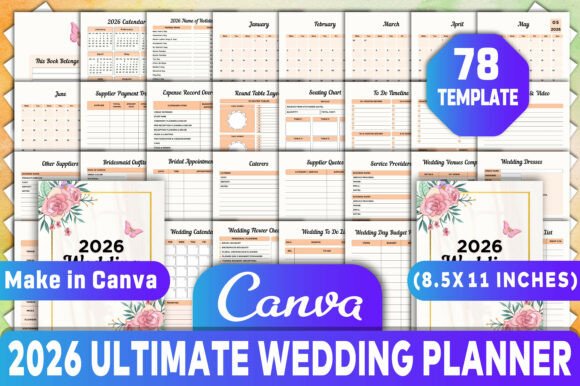
This isn’t a static PDF you print once and tuck into a binder. It’s a living interior file optimized for both professional use and personal execution. When you download the 2026 Ultimate Wedding Planner Canva KDP Interiors, you receive a complete, print-ready package—PDF, JPG, and PNG formats—all fully editable in Canva. Every page, section, and layout is 100% customizable: change fonts, adjust colors, insert your own venue photos, or restructure timelines to match your actual ceremony date. That flexibility matters because no two weddings follow the same rhythm—and no planner should force one.
How It Fits Into Real Planning Workflows
The 2026 Ultimate Wedding Planner works across three core phases: preparation, execution, and reflection.
Preparation starts months—or even a year—before the event. Here, the planner serves as your central repository. Use the 2026 Calendar and Monthly Planner (Jun–Dec) to anchor deadlines: deposit due dates, dress fittings, catering tastings, and rehearsal dinner confirmations. The To Do By Month and To Do Timeline sections let you reverse-engineer tasks from key milestones, ensuring nothing slips through scheduling cracks. Because all entries are editable, you can drag-and-drop items between months as real-world delays or accelerations occur—no rewriting or cross-outs needed.
Execution begins when contracts are signed and deposits paid. This is where the Supplier Payment Tracker, Expense Record Overview, and Budget By Category tools become indispensable. Rather than toggling between spreadsheets, notes apps, and email threads, log each vendor payment, categorize it (e.g., “Florist,” “Photography,” “Venue”), and instantly see how spending aligns with your original allocation. The Round Table Layout and Banquet Table Layout pages support physical setup planning—print them, sketch directly on the PDF, or drop them into Canva to overlay seating names and dietary notes. You’re not just tracking data—you’re visualizing space, flow, and responsibility.
Reflection happens after the last guest leaves—but before you close the chapter. The Wedding Guest Checklist, Wedding Day Guest List, and Rehearsal Dinner logs help reconcile RSVPs, track plus-ones, and flag last-minute changes. More importantly, the Expenses Tracker and Supplier Quotes pages let you compare projected vs. actual costs, building institutional knowledge for future events—or even for clients, if you’re a planner, designer, or educator.
Integration With Tools You Already Use
The 2026 Ultimate Wedding Planner Canva KDP Interiors doesn’t replace your existing stack—it connects to it. If you manage budgets in Excel or Google Sheets, export expense summaries from the planner’s tracker and paste them into your master sheet for reconciliation. If you coordinate with vendors via email or WhatsApp, embed direct links to specific Canva pages (e.g., “See updated Flower Checklist here”) using Canva’s shareable link feature. For photographers or videographers, the Photography Video section gives you space to list shot lists, lighting preferences, and must-capture moments—then export as a clean PDF handoff.
For educators or small business owners creating wedding-related courses or digital products, this planner functions as a production asset. Drop your branding into the Theme Color Scheme page, add your logo to the This Book Belongs To cover, and generate multiple versions—client-facing, workshop handouts, or white-label templates—for different audiences. Because the file is layered and organized in Canva, swapping out elements like Bridal Shower Invites or Bridesmaid Outfits takes seconds—not hours.
Practical Implementation Tips
- Start with the calendar—not the checklist. Open the 2026 Calendar first. Highlight holidays, family travel windows, and blackout dates. Then populate the Monthly Planner Jun–Dec backward from your ceremony date. This prevents overloading high-stress months (e.g., scheduling dress alterations during tax season).
- Use color strategically. In Canva, assign consistent hues to categories: red for deadlines, green for confirmed items, blue for pending quotes. Export as PDF for printing, but keep the Canva file open for quick edits mid-day.
- Print only what you need—when you need it. The Table Seating Chart Planner and Seating Chart are most useful 3–4 weeks out. The Wedding Dress and Wedding Roles pages matter earlier. Avoid printing the full 100+ page interior upfront; instead, batch-print by phase.
- Pair supplier tracking with contract review. When logging a caterer’s quote in the Supplier Quotes section, paste the clause number referencing cancellation terms or overtime fees. That way, your planner becomes both a tracker and a legal reference—not just a to-do list.
Long-Term Usability and Consistency
A good planner endures beyond one event. The 2026 Ultimate Wedding Planner supports reuse: rename “Bride & Groom Preparation” to “Partner A & Partner B Prep” for inclusive language, update the 2026 Name of Holiday for future years, or repurpose the Shopping List and Service Providers pages for anniversary planning or vow renewal events. Its modular design means you’re never locked into a single format—if your workflow shifts to Notion or Airtable, extract the structure first: columns, categories, and dependencies—then rebuild intelligently, not reactively.
Quality control is built in. Pages like Expense Record Overview and Bookings Deposits include auto-calculating fields in Canva (via text boxes labeled “Total So Far” or “Remaining Balance”). These aren’t formulas—but they prompt consistent entry habits. Likewise, the Preparation sketch and Theme Color Scheme pages encourage visual alignment early, reducing costly mid-process revisions.
Who Benefits Most—and Why
Professionals—wedding coordinators, event designers, and boutique planners—use this as a client-facing framework. Customize the Wedding Venues Comparison grid with your shortlisted locations, embed your brand fonts, and send it as a pre-consultation tool. Freelancers and creators turn the Bridal Shower Invites and Rehearsal Dinner pages into mini-products: sell them as standalone Canva templates or bundle them with coaching packages.
Small business owners running stationery shops or floral studios integrate the Wedding Flower Checklist and Caterers sections into their onboarding packets—helping clients articulate needs before the first call. Educators use the Wedding Roles and Guest Checklist pages to teach project delegation and stakeholder mapping in adult learning workshops.
And for individuals? It removes ambiguity. Knowing exactly where to record a $200 deposit for DJ services—or how to map 85 guests across six banquet tables—reduces cognitive load. You’re not managing anxiety. You’re managing inputs, outputs, and outcomes—with clarity, consistency, and control.