2025–2026 Study Planner
Whether you’re returning to school, guiding students through a rigorous academic year, launching an online course, or managing multiple certifications and self-directed learning goals—the 2025–2026 Study Planner is built for clarity, consistency, and creative control. It’s not just another printable—it’s a fully editable, KDP-ready system designed by educators and creators who know how messy real-world learning can get.
A Planner That Grows With Your Goals
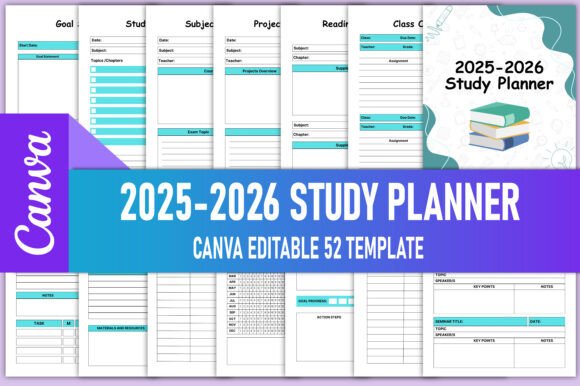
This isn’t a static calendar with blank lines. It’s a 52-page, 8.5 × 11-inch toolkit that includes dedicated sections for Daily Planner, Weekly Schedule, Subject Lesson Plan, Assignment Tracker, Reading List, Project Planner, and even Seminar Notes and Group Contact Details. Each page supports intentionality—not just logging time, but mapping progress across dimensions: knowledge, habit, collaboration, and reflection.
The dual-year layout (2025 + 2026 calendars) means seamless transition between semesters, quarters, or certification cycles—no mid-year reprints or frantic redesigns. And because it’s delivered as high-resolution, print-ready PDFs (CMYK, 300 PPI, no bleed), it meets Amazon KDP’s strict production standards out of the box.
Edit Freely—Then Publish Confidently
You’ll receive an editable Canva link—fully customizable in your own Canva account. Change fonts, adjust colors, swap icons, add your logo, or localize terminology (e.g., “Term” instead of “Semester,” “Tutorial” instead of “Seminar”). You’re not locked into someone else’s design logic—you’re empowered to align every element with your brand voice, audience expectations, or pedagogical approach.
Important note: To preserve editing access, make a copy in your own Canva account before customizing. This ensures your version stays active—even if the original template is updated or archived.
Who’s Already Using This—and How?
- Educators & Tutors: Use the Subject Overview and Lesson Plan pages to scaffold curriculum maps for hybrid or flipped classrooms. Add QR codes linking to video explanations or digital handouts directly onto printed pages.
- Freelance Course Creators: Repurpose the Project Planner and Goal Setting spreads to outline cohort-based course launches—including content deadlines, community check-ins, and feedback windows.
- Graduate Students & Researchers: Leverage the Reading Tracker and Seminar Notes layouts to annotate journal articles, log conference takeaways, and cross-reference citations across disciplines.
- KDP Publishers: Bundle this planner with companion workbooks (e.g., “Critical Thinking Prompts” or “Lab Report Templates”)—all using consistent interior styling and sizing for cohesive series branding.
- Homeschooling Families: Customize the My Weekly Schedule and Study Habits Tracker to reflect flexible rhythms—morning math blocks, afternoon nature journals, weekly skill reviews—without rigid hourly constraints.
Creative Adaptations That Stand Out
Don’t just print and go—reimagine the structure. Try these practical variations:
- Color-Coded Subject Systems: Assign each subject a hue (e.g., blue for science, green for language), then apply those colors consistently across trackers, headers, and icons. Visual continuity reduces cognitive load during review sessions.
- Modular Page Swaps: Remove lower-priority sections (e.g., “Class Overview”) and replace them with custom inserts—like a Wellness Check-In grid or Peer Feedback Log—tailored to your learners’ needs.
- Hybrid Digital-Print Workflows: Print only the core weekly/daily pages, then use Canva’s “Present” mode to display dynamic elements like live reading lists or rotating goal reminders on a classroom screen or personal tablet.
- Multilingual Versions: Translate key headers and instructions (e.g., “Assignment Grade Tracker” → “Seguimiento de Calificaciones”) while keeping date formats and layout intact—ideal for bilingual learners or international schools.
Why Format Consistency Matters
Clarity isn’t accidental—it’s engineered. The 2025–2026 Study Planner uses uniform margins, consistent typography hierarchy, and ample white space so users scan quickly and act confidently. No crowded tables. No ambiguous icons. No competing visual weights. Every page invites focus—not frustration.
That consistency also scales: when you publish multiple planners (e.g., a 2025–2026 Exam Prep Edition or STEM-Focused Study Planner), readers instantly recognize your design language. Trust builds through repetition—not sameness, but reliability.
Getting Started—Without Overcomplicating
Start small. Pick one section that solves your biggest pain point right now—maybe it’s the Homework Tracker if assignments keep slipping, or the Study Habits Tracker if consistency feels elusive. Print just those pages. Fill them for two weeks. Notice what works. Then expand.
If you’re publishing on KDP, test your final PDF with Amazon’s previewer. Confirm all text is legible at 100% zoom, margins are safe, and CMYK colors render accurately across devices. These details separate “good enough” from “trusted resource.”
Your Next Step Is Simple
You’ll receive print-ready PDFs, PNGs, and JPGs—all optimized for clarity and compatibility. No hidden layers. No missing fonts. No guesswork about trim or resolution. Just clean, professional interiors ready for upload.
This planner doesn’t assume your schedule, your subjects, or your learning style. It provides the framework—so you bring the focus, the discipline, and the creativity. Whether you’re planning a semester, launching a course, or building a learning business, the 2025–2026 Study Planner meets you where you are—and helps you move forward, intentionally.
Follow on my profile for new products—especially upcoming editions like the 2025–2026 Exam Prep Bundle and Remote Learning Companion Planner.