Productivity Workbook Canva KDP: Your All-in-One Planning System—Ready to Customize, Print, and Use Today
If you’ve ever stared at a blank planner page wondering where to even begin—or worse, bought a beautifully designed journal only to realize it doesn’t match how you actually think, work, or recharge—you’ll appreciate what the Productivity Workbook Canva KDP delivers. This isn’t just another printable PDF. It’s a thoughtfully structured, fully editable interior template built for real life: messy schedules, shifting priorities, creative bursts, quiet mornings, late-night reflections, and everything in between.
What Exactly Is the Productivity Workbook Canva KDP?
The Productivity Workbook Canva KDP is a professional-grade, print-ready interior file designed specifically for Amazon KDP publishing—but equally powerful for personal use. When you download it, you get three core formats: a high-resolution printable PDF (ideal for printing at home or with a local printer), plus JPG and PNG files for digital note-taking or screen-based planning. Most importantly, you also receive an editable Canva link—a live, 100% customizable version of the entire workbook inside Canva’s intuitive interface.
That means no locked layers, no hidden fonts, no “can’t edit this” surprises. Every heading, checkbox, timeline, reflection prompt, and habit tracker is yours to adjust: change colors to match your brand, swap out time-blocking sections for your team’s workflow, translate prompts into another language, or simplify layouts for teens or neurodivergent users. It’s not pre-set—it’s pre-structured, so you keep the scaffolding but own the design.
Where and When Does This Workbook Actually Fit Into Real Life?
Think about your last Monday morning. Maybe you opened five tabs, checked Slack twice, scrolled Instagram for seven minutes, then realized you hadn’t touched your top priority—and it’s already noon. The Productivity Workbook Canva KDP helps interrupt that cycle—not with rigid rules, but with flexible, context-aware tools.
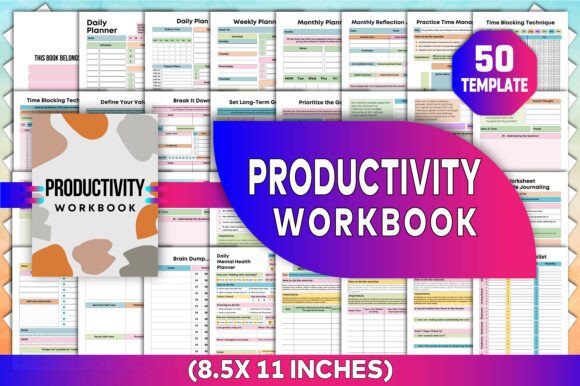
A freelance graphic designer uses the Project Planner + Time Blocking Technique pages to map client deadlines across overlapping timelines—then copies those blocks into her Google Calendar. A high school teacher prints the Daily Mental Health Planner pages for her advisory group, adapting the Mindful Breathing Worksheet and Gratitude Journaling Prompts for classroom warm-ups. A small business owner inserts her logo, swaps “Income Tracker” for “Client Payment Log,” and prints double-sided booklets for her team’s quarterly goal reviews.
It works because it’s modular. You don’t have to commit to 180 pages of rigid structure. You open the Canva file, duplicate the Bi-weekly Budget Plan, delete the finance section, and paste in her “Social Media Detox 3-Day Challenge” instead. Or you pull just the Cleaning Checklist and Cleaning Schedule pages, print them on sticker paper, and stick them on pantry doors.
Who Benefits—and How?
- Content creators & bloggers: Use the Define Your Values and Prioritize the Goal worksheets to align content calendars with long-term vision—not just algorithm trends. Export the Contact List and Password Tracker as standalone reference sheets.
- Educators & coaches: Adapt the Daily Self-Care and Brain Dump pages for student wellness check-ins—or turn the Monthly Reflection Journal into a guided end-of-semester review tool.
- Freelancers & solopreneurs: Combine the Expense Tracker, To-Do List, and Habit Tracker into one weekly dashboard. Add your service packages directly into the Project Planner section.
- Everyday users managing transitions: Whether launching a side hustle, recovering from burnout, supporting aging parents, or adjusting to remote work—the Track Your Sleep, Focusing on Hobbies, and Daily Plan pages offer grounded, non-judgmental structure without overwhelm.
Why “Editable in Canva” Makes All the Difference
Most printable planners force you into their system—even when it clashes with how your brain works. The Productivity Workbook Canva KDP Interiors flips that script. Because it lives in Canva, you can:
- Resize text boxes to fit longer journal entries or tighter bullet points.
- Swap fonts instantly—no need to hunt down license-free alternatives.
- Add your own icons, brand colors, or motivational quotes without design skills.
- Export individual pages as PNGs for Notion or Obsidian, or combine multiple sections into a custom 40-page mini-planner.
This flexibility matters most when life changes fast. A new job? Duplicate the Weekly Planner and rename it “Hybrid Work Week.” Starting therapy? Paste in your therapist’s reflection questions next to the Monthly Reflection Journal. Adopting a pet? Insert a “Puppy Care Tracker” right beside the Habit Tracker.
What to Consider Before You Download
First—this is a workbook interior, not a full KDP book file. You’ll need to add your own cover (or use a matching Canva cover template) and format the final PDF to Amazon’s specs (8.5" × 11", bleed, margins). But if you’ve published before—or plan to—it cuts weeks off interior design time.
Second—while the Canva link gives total control, it requires a free Canva account. No premium subscription is needed for basic editing, though some advanced elements (like certain fonts or stock photos) may prompt an upgrade. All core functionality—including text, layout, color, and structure—is fully editable on the free tier.
Third—this isn’t a passive tool. Its power multiplies when you treat it like a living document: revisiting the Set Long-Term Goals worksheet every quarter, reworking the Time Blocking Technique after a major schedule shift, or archiving old Daily Self-Care pages to spot patterns over time.
Real Outcomes, Not Just Features
You won’t just “have more pages.” You’ll spend less time hunting for the right planner and more time doing work that matters. You’ll stop rewriting the same to-do list in five different apps. You’ll notice when your energy dips mid-afternoon—and use the Pomodoro Planning and Mindful Breathing pages to reset, not push through. You’ll track income and expenses side-by-side with your values—and make decisions that reflect both.
The Productivity Workbook Canva KDP doesn’t promise perfection. It offers clarity. Consistency. Choice. And the quiet confidence that comes from using a tool that grows with you—not the other way around.